Conversations
One row per conversation. This is the record of what visitors actually asked — and it is the raw material for everything on the SEO Insights tab.
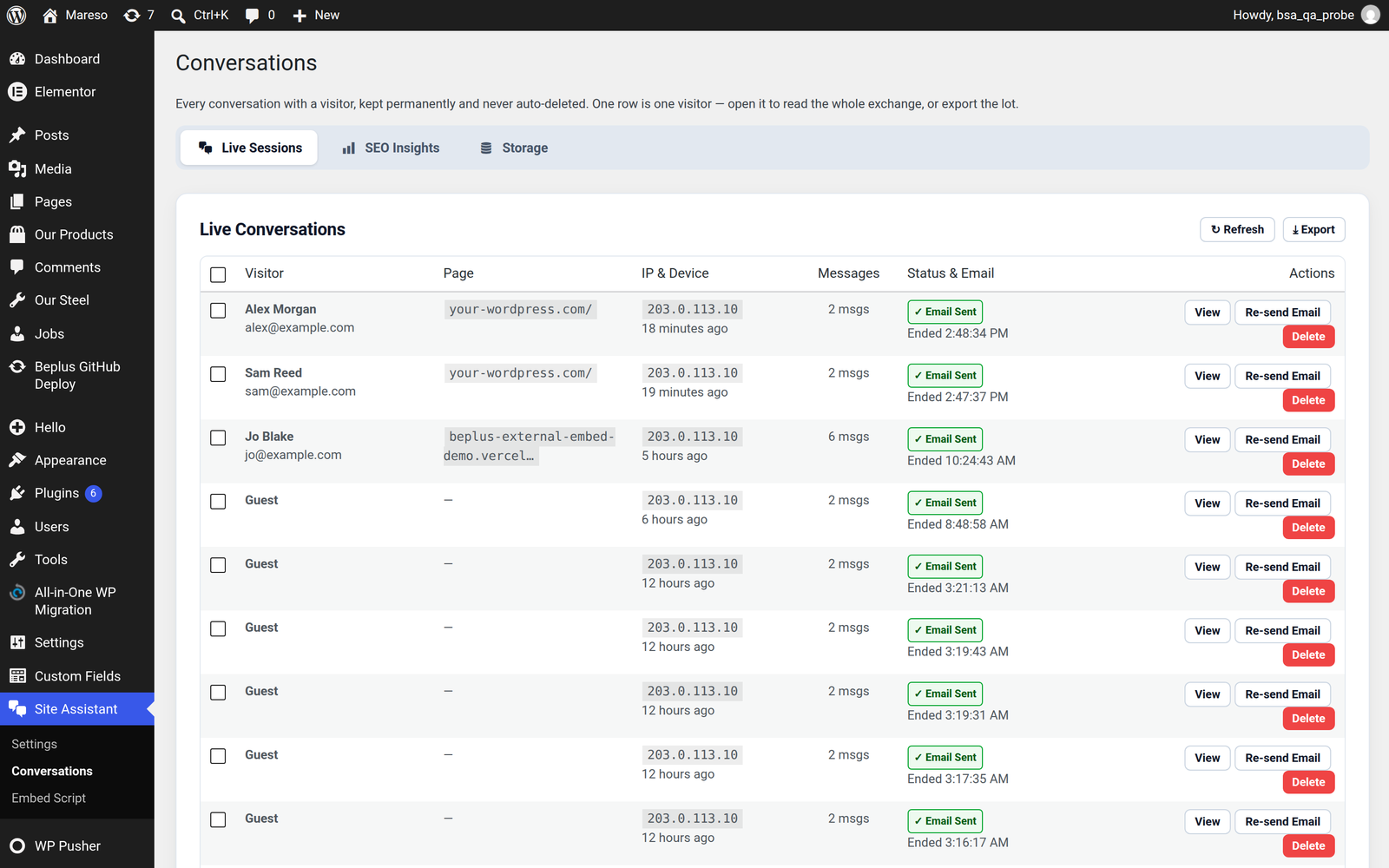
One row is one conversation
Not one message, not one session per page. A visitor who asks six questions in one visit produces one row, with the whole back-and-forth stored inside it.
That makes the list readable at a glance: fifteen rows means fifteen visitors had a conversation with you.
The tabs
| Tab | What it is for |
|---|---|
| Live Sessions | The conversation list — read transcripts, re-send emails, delete |
| SEO Insights | What people ask about, and what your site has no answer for |
| Storage | How much space the records take, and manual cleanup |
The columns
| Column | What it tells you |
|---|---|
| ☑ | Tick to act on several conversations at once |
| Visitor | The name and email from the lead form, or "Guest" if the form was off |
| Started | When the conversation began |
| Turns | How many question-and-answer exchanges took place |
| Page | The page the visitor was on when they started chatting |
| Sent | Whether the transcript email has gone out yet |
| Actions | See below |
Page is the column worth getting into the habit of reading. It answers "which of my pages make people ask questions?", and it works even when the AI is switched off, because it is counted straight from the record.
The actions on each row
| Action | What it does |
|---|---|
| View | Opens the full transcript — every question and answer, in order |
| Re-send Email | Sends that transcript to your notification address right now |
| Delete | Removes the conversation and what the assistant remembered about that visitor |
Re-send Email is the one to use when a visitor asks you to follow up, or when you spot an important conversation after the automatic email has already gone.
⚠️ Deleting is permanent. Deleting a conversation removes the whole exchange, including the assistant's memory of that visitor. There is no undo, and the transcript is your only record of what was said. Export first if you might want the data.
Working with several at once
Tick the boxes on any rows, and a bar appears with the actions available for the selection:
- Delete the selected conversations
- End and email them — closes each session and sends its transcript
Both report back exactly what succeeded and what did not, rather than quietly half-finishing. If you select fifteen and three fail to email, it says so.
Tick the box in the heading row to select every conversation on the current page. Selection is cleared when you change page, so you can never delete more than you can see.
Finding things again
Pagination is at the bottom. Choose 10, 20, 30 or 40 conversations per page, and the footer tells you where you are — "Showing 21–40 of 152" — so the total is never a guess.
Refresh reloads the list with the latest conversations. Useful while you are testing: ask the widget a question in another tab, press Refresh, and watch the row appear.
Exporting
The Export button at the top of the tab produces a file of your conversations — CSV for a spreadsheet, or JSONL for feeding to an AI for analysis.
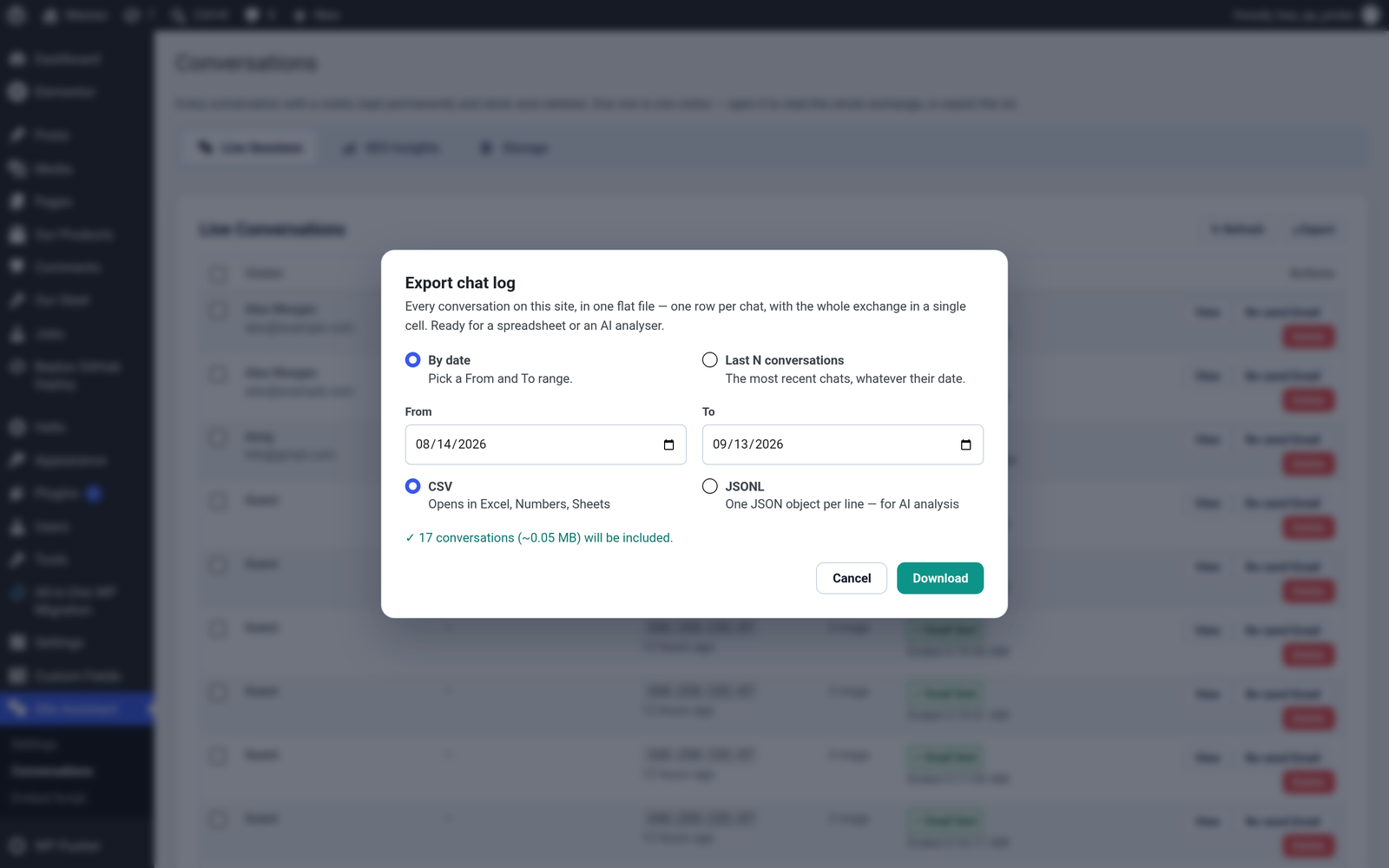
Two ways to choose what goes in:
| Option | Use it when |
|---|---|
| By date | You want everything in a period — a month, a campaign |
| Last N conversations | You want the most recent hundred, without caring when they happened |
The dialog tells you how many conversations and roughly how much data the download will contain before it starts, so a large export is never a surprise.
Exports are read-only. Nothing in your database is changed by exporting, and the file comes out one row per conversation with the full transcript in a single column.
Finding out what to write next
The reason to keep conversations is not nostalgia. Spend five minutes on the SEO Insights tab after a busy week: it turns this list into a concrete answer to "what should we put on the website next?"