Knowledge Base
This is where you decide what the assistant is allowed to know. Everything on this tab feeds the answers.
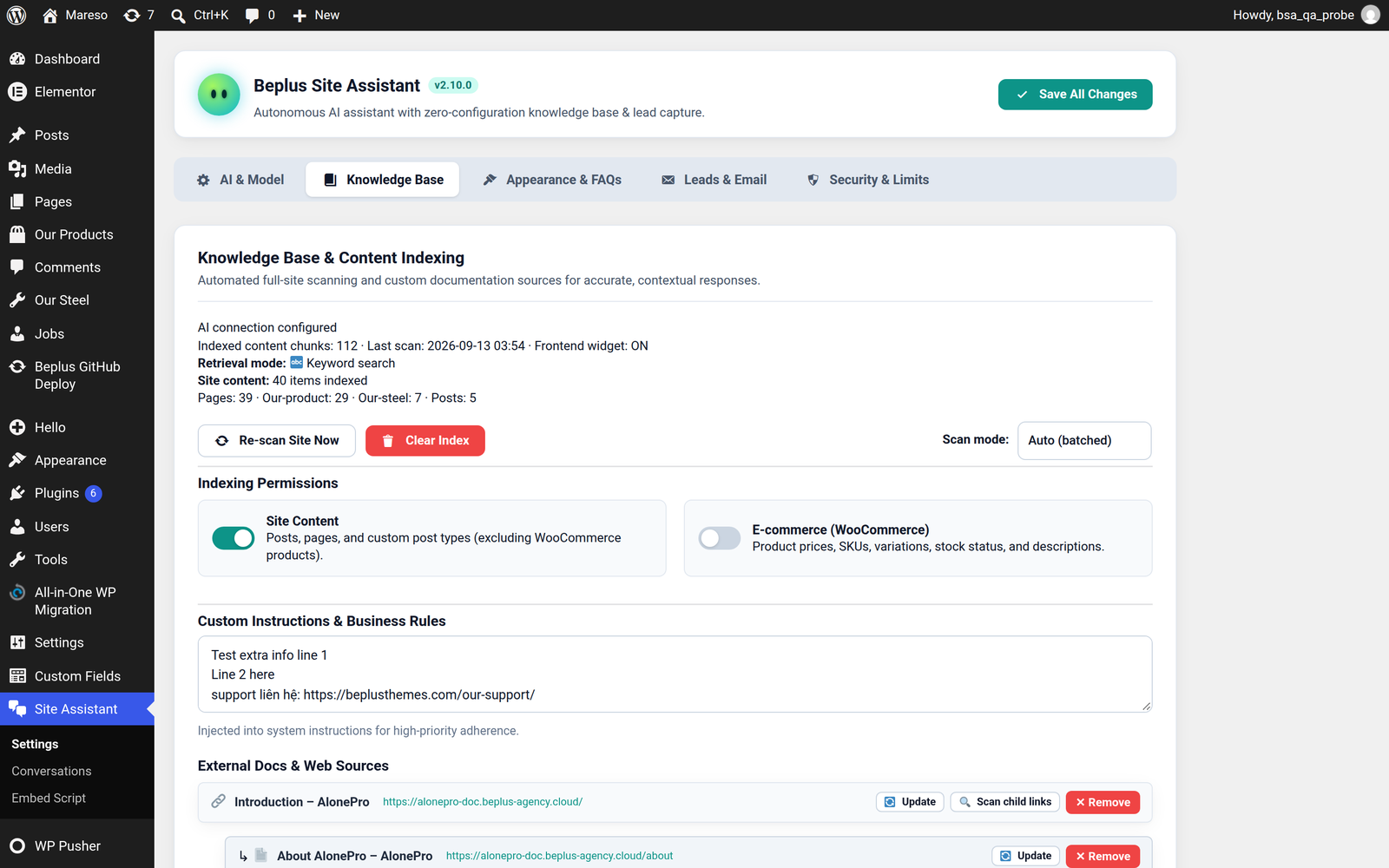
Scanning your site
Press Re-scan site to read your content and build the searchable index. The first scan is the slow one; later scans only pick up what changed.
The plugin also re-scans once a day by itself, so new posts and edited prices are picked up without you thinking about it.
Scan mode controls how that work is done:
| Mode | What it does | Choose it when |
|---|---|---|
| Auto (batched) | Works through the site in small batches, holding only a little in memory at a time | Larger sites, or a modest hosting plan |
| Full (single pass) | Reads everything in one go | Small sites — slightly faster |
If a scan ever fails part-way on a big site, switching to Auto is the usual fix.
What gets indexed
Two permissions, and they are independent:
- Site Content — posts, pages and custom post types. This covers most sites completely.
- E-commerce (WooCommerce) — product prices, SKUs, variations, stock status and descriptions. Off by default, and worth turning on only if you actually sell through the site.
The Site Status panel shows what was found — counts per group, and the titles it picked up — so you can confirm the right things were read rather than assuming.
Custom Instructions & Business Rules
A free-text box for the things that are true about your business but are not written on any page.
Put here:
- Opening hours and holidays
- Hotline numbers and support email
- Delivery areas and timeframes
- Return policy in one sentence
- Anything the assistant should never discuss
Instructions here take priority over general knowledge, so this is the right place for corrections like "we do not ship outside the EU" when a page is less clear about it.
💡 Short and factual beats long and polite. "Open Mon–Fri 8:00–17:00 CET. Closed public holidays." works better than a paragraph explaining that the team is always happy to help during business hours.
External Docs & Web Sources
Content that lives outside WordPress — a help centre, a PDF-turned-page, documentation on another domain.
| Button | What it does |
|---|---|
| + Add Web URL / Doc | Fetches a page and stores its text. If the page has sub-pages you can choose to follow them too. |
| + Upload Markdown (.md) | Upload a .md file directly — useful for product manuals and internal notes. |
| 🔄 Re-sync All Docs | Re-fetches every URL source, for when a page was edited at the source. |
| 🗑️ Clear All External Docs | Removes all external sources and the chunks indexed from them. Nothing else is touched. |
Each source can be refreshed or removed on its own, so one outdated page does not force you to rebuild everything.
Keeping it accurate
The index is a copy of your content, not a live look-up. Two habits keep it honest:
- After a big content change, press Re-scan site rather than waiting for the nightly run.
- When an answer is wrong, check whether the page it came from is wrong or missing — the SEO Insights gap report is built for exactly that question.